
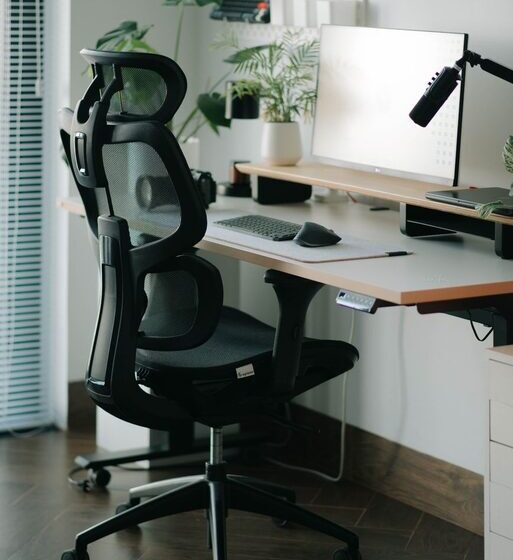

Creating a workspace that promotes both focus and comfort is essential for productivity and overall well-being. Whether you work from home, study, or spend hours at a desk, an optimized setup can make a significant difference in how you feel and how much you get done. In this post, we’ll explore practical tips for designing a desk setup that enhances concentration and comfort.
Why Your Desk Setup Matters
Your environment plays a key role in your ability to focus and work efficiently. An uncomfortable or cluttered workspace can lead to distractions, physical discomfort, and even fatigue. On the other hand, a well-organized and ergonomic setup encourages better posture, reduces strain, and helps maintain mental clarity.
Choosing the Right Desk and Chair
Desk Height and Size
Select a desk that fits your space and allows you to work without feeling cramped or overstretched. The ideal desk height is generally around 28 to 30 inches, but it should match your body size to prevent strain. If possible, consider an adjustable desk to alternate between sitting and standing, which can improve circulation and reduce fatigue.
Comfortable and Supportive Chair
Invest in an ergonomic chair that supports your lower back and allows you to adjust seat height, armrests, and backrest tilt. A chair with good lumbar support helps maintain the natural curve of your spine, preventing discomfort during long work sessions.
Organize for Efficiency and Minimal Distraction
Declutter Your Desk Surface
Keep only essential items on your desk to minimize distractions. Store extra supplies like papers, pens, and gadgets in drawers or organizers. A tidy workspace helps clear your mind and improve focus.
Use Desk Organizers
Trays, pen holders, cable management clips, and small bins can keep your tools within reach but neatly arranged. This prevents clutter buildup and makes it easier to find what you need quickly.
Optimize Lighting for Comfort and Productivity
Natural Light Benefits
Position your desk near a window if possible. Natural light can boost mood, energy, and focus. However, avoid glare on your computer screen by adjusting blinds or curtains.
Task Lighting
Add a desk lamp with adjustable brightness and direction. Focused lighting reduces eye strain when reading or writing and ensures your workspace remains well-lit during darker hours.
Ergonomics for Health and Focus
Monitor Placement
Place your monitor about an arm’s length away, with the top of the screen at or slightly below eye level. This posture helps prevent neck and eye strain.
Keyboard and Mouse Position
Keep your keyboard and mouse close enough to avoid overreaching, with your forearms parallel to the floor or slightly angled. Consider using ergonomic keyboards or mouse devices if needed.
Take Regular Breaks
Incorporate short breaks every hour to stand, stretch, and rest your eyes. These pauses help prevent fatigue and maintain concentration throughout the day.
Personalize Your Workspace
Add Plants or Decorations
Including greenery or personal items can make your workspace feel inviting and inspire creativity. Just be careful not to overcrowd your desk.
Use Calming Colors
Choose soothing colors for your desk accessories or wall decor. Colors like soft blues, greens, or neutrals can reduce stress and help maintain focus.
Maintain a Good Routine
Set a Consistent Schedule
Try to start and end your work sessions at regular times. A routine trains your brain to enter ‘work mode’ and can improve productivity.
Keep Hydrated and Snack Smart
Keep a water bottle nearby and have healthy snacks available. Staying hydrated and nourished supports mental clarity and energy.
—
By applying these desk setup tips, you can create a workspace that supports both your comfort and concentration. The right environment not only improves productivity but also contributes to your overall health and happiness while working. Start small by adjusting one or two elements and build from there to find what works best for you.